Tuesday, December 04, 2007

Infopath cannot add the event handler

While working in Infopath 2007 managed code when i tried to attach managed code to existing
form i got the following error:

Error :

Infopath cannot add the event handler

Infopath cannot create the visual basic or C# project

The location for the visual basic or C# project cannot be found or cannot be accessed


So next steps is to search internet , well no luck in that too . Then i decided to try different things with my form settings and shazam!!! got the form working .

Solution in my case :
  • Go to Tools -> Options ->Design Tab
  • Check the language for programming /select the desired language
  • Go to Tools -> Form Options -> Programming Section
  • Select the programming language which you selected in previous settings

That should be good enough to make you go forward.

In my case there was difference in language settings which caused all these errors, which might be in your case too.

Happy Infopath Programming!!!!

Friday, November 30, 2007

Writing Managed Code for Browser based Infopath 2007 Form

Ever wondered how to write managed code for Browser based infopath form , check this out :

http://www.microsoft.com/downloads/details.aspx?familyid=db1d99d9-0a31-45de-8efb-16c75e194dc3&displaylang=en

Steps in Nutshell :

  • Change the form security to full trust

Tools -> Form Options -> Security and Trust -> Full Trust

  • Publish Infopath Form to Network Share

  • Upload form to the server

Central Administration > Application Management > Manage Form Templates

  • Active form for desired site collection

  • Access the form using url of following format :

http://"server name"/_layouts/formserver.aspx?xsnlocation="site collection address "/formservertemplates/"form name".xsn&openin=browser&QueryParametername="value"

Tuesday, November 27, 2007

Content Deployment MOSS Hurdles

Collection of hurdles which you might encounter while setting up content deployment in SharePoint 2007

http://soerennielsen.wordpress.com/2007/06/19/the-long-path-to-content-deployment/

Content Deployment in Three Steps ........

Step 1:
Allow Incoming Content Deployment Jobs on the Production Site

Step 2 :
Create Content Deployment Path and Job from Staging to Production

Step 3 :
Run Content Deployment Job


For step by step instruction check out the following article :
http://blogs.msdn.com/jackiebo/archive/2007/02/26/content-deployment-step-by-step-tutorial.aspx

Content Deployment Failed Error

You started with content deployment , defined the content path and job . Everything looks good till you actually run the job and bang the mighty long error

"Failed to compare two elements in the array. at System.Collections.Generic.ArraySortHelper`1.QuickSort[TValue](T[] keys, TValue[] values, Int32 left, Int32 right, IComparer`1 comparer) at System.Collections.Generic.ArraySortHelper`1.QuickSort[TValue](T[] keys, TValue[] values, Int32 left, Int32 right, IComparer`1 comparer) at System.Collections.Generic.ArraySortHelper`1.Sort[TValue](T[] keys, TValue[] values, Int32 index, Int32 length, IComparer`1 comparer) at System.Collections.Generic.ArraySortHelper`1.Sort(T[] items, Int32 index, Int32 length, IComparer`1 comparer) at System.Array.Sort[T](T[] array, Int32 index, Int32 length, IComparer`1 comparer) at System.Collections.Generic.List`1.Sort(Int32 index, Int32 count, IComparer`1 comparer) at System.Collections.Generic.List`1.Sort(IComparer`1 comparer) at Microsoft.SharePoint.Deployment.WebSerializer.GetDataFromObjectModel(Object obj, SerializationInfo info, StreamingContext context) at Microsoft.SharePoint.Deployment.DeploymentSerializationSurrogate.GetObjectData(Object obj, SerializationInfo info, StreamingContext context) at Microsoft.SharePoint.Deployment.XmlFormatter.SerializeObject(Object obj, ISerializationSurrogate surrogate, String elementName, Boolean bNeedEnvelope) at Microsoft.SharePoint.Deployment.XmlFormatter.Serialize(Stream serializationStream, Object topLevelObject) at Microsoft.SharePoint.Deployment.ObjectSerializer.Serialize(DeploymentObject deployObject, Stream serializationStream) at Microsoft.SharePoint.Deployment.SPExport.SerializeObjects() at Microsoft.SharePoint.Deployment.SPExport.Run() *** Inner exception: Object reference not set to an instance of an object. at Microsoft.SharePoint.SPFeature.EnsureProperties() at Microsoft.SharePoint.SPFeature.get_TimeActivated() at Microsoft.SharePoint.Deployment.WebSerializer.ExportFeatureComparer.System.Collections.Generic.IComparer.Compare(ExportObject exportObject1, ExportObject exportObject2) at System.Collections.Generic.ArraySortHelper`1.QuickSort[TValue](T[] keys, TValue[] values, Int32 left, Int32 right, IComparer`1 comparer)"

OR

" Content deployment failed.The exception thrown was 'System.InvalidOperationException' : 'Failed to compare two elements in the array.'

Solution :
The exception basically means that some of the features activated at the site collection level no longer exist on disk. Their feature definition files have probably been deleted. This can easily occur if you delete some features from your solution packs without deactivating/reactivating all features on deployment .

So pin point the features causing trouble and remove it and you will be good to go .

Tuesday, October 30, 2007

Cross Browser Support for MOSS

The newer version of sharepoint , MOSS 2007 has better cross browser compatibility than the older version . It supports the following browswer :


Windows
Firefox 1.5+
Netscape 8.1+
Mozilla 1.7+
Macintosh
Safari 2.0+
Firefox 1.5+
Unix/Linux
Firefox 1.5+
Netscape 7.2+

Check out the following article to completely understand the browser compatibility and feature support by Level 2 browser :

http://technet2.microsoft.com/Office/en-us/library/ff6c5b8c-59bd-4079-8f0b-de4f8b4e0a861033.mspx?mfr=true

Wednesday, October 17, 2007

Timer Job Failed

ERRORS :
  • The job to enable features on existing sites failed
  • Application Server Administration Service Timer Job Failed

In such cases check the Windows Timer Service running in server , also check the credentials the timer is running which might be a reason of the Jobs failing in server.

Wednesday, October 10, 2007

The file web.sitemap required by XmlSiteMapProvider does not exist

I am using a custom XMLSiteMapProvider where in i have defined a web.sitemap file with urls.
The application worked fine for administrators but i got this error when i tried other users. I am using this control in a SharePoint 2007 Page . After lots of trial it came to my notice that actual error was not identification of the file .The problem was that the normal sharepoint user didn't had enough permission to access the web.sitemap file in web server .

This worked once i gave autheticated user access to the file,kind of fishy though , as i am not expecting this behaviour.

Friday, October 05, 2007

CSS not working on LinkButton

This was my issue , i had defined link button in asp.net like this :


_linkNewIncident = new System.Web.UI.WebControls.LinkButton();
_linkNewIncident.Text = "Creat New Incident";
_linkNewIncident.Click += new EventHandler(linkNewIncident_Click);
_linkNewIncident.CssClass = "HelpDeskLink";

and corresponding CSS as :
.HelpDeskLink { color:white ; font-weight :bolder ; font-size :x-small ; }

.HelpDeskLink a { color:white ; font-weight :bolder ; font-size :x-small ; }


when i ran the application , my links were still blue and was not reflecting any CSS behaviour which is supposed to be white as per my CSS :-(


After some search i got the solution .

Solution : Define "CSS Pseudo-classes"

I modified my CSS style class to the following and it worked ..


a.HelpDeskLink:link
{
color:white ;
font-weight :bolder ;
font-size :x-small ;
}

Monday, October 01, 2007

Server error: This item cannot be deleted because it is still referenced by other pages

You might get this error when you try to delete from the _catalogsmasterpage directory ,. Microsoft has provided a solution which doesn't look convincing at all :

check : http://support.microsoft.com/kb/926812

I used a different method:
  • Open the Master gallery in Explorer view
  • Create a Directory named "Delete"
  • Cut all the un-wanted Master Pages and paste it inside the "Delete" directoty
  • Delete the "Delete" Directory

And you got rid of all the unwanted pages .

Friday, September 28, 2007

Access Denied While Create Page Action

My user came back to me in morning and said that he is not able to create a page and was facing "Access Denied" error, i was amazed as the user had full control to the site. So i tried it with my ID and BANG same error. I was not able to make page too havig the same "Full Control" access.

After a complete half day of search and trying different things gladly it worked ,saved my weekend fun.

Solution which i used to get over the error is to add my ID to the "Administrators" group of site and it's all fixed.

Am not sure weather it is something by architecture of other issue but it saved my day.

I got one solution which still needs to be tested :
Check out :
http://wss.asaris.de/sites/walsh/Lists/WSSv3%20FAQ/DispForm.aspx?ID=1148

Thursday, September 20, 2007

Unable to open Page due to Web Part Error . "Saviour" Web Part Maintenance Page

At some day you decide to test your new webpart and unfortunately web part bombs badly and you end up with page which looks something like this :


Now second thought is to open the page using Sharepoint designer and removing web part , but to the height of disappointment even Designer throws all kind of error.You are all stuck thinking "How can i remove web part ? "

Well trick is to append your page url with querystring " ?contents=1 ".

So if your stuck url is http://localhost then append the query string
http://localhost?contents=1

This will take you to the saviour page "Web Part Maintenance Page" ,remove the webpart and have a happy day forward :)

Wednesday, September 12, 2007

Workflow Failed in SharePoint with Error: Failed on Start (retrying)

In case you are the unlucky one to get this error then i have couple of suggestions .One of them worked for me :)

Check out the 2 ways which might help you to overcome this error:

  • The workflow definition is invalid. :This can be figured out as SPD pops error message in such case

  • Changing the identity of the application pool to a user with administrative rights can cause the workflow to “fail to start“. If this sounds like something you've done, try changing it back to network service and try running the workflow again. (worked for me)

Check out the article by Jason Nadrowski

Tuesday, July 10, 2007

"An unexpected error has occurred" in MOSS 2007


Ever wondered what the heck is going on when you are popped with error "Unexpected Error" when developing on SharePoint, well this approach might make life simpler ,it made mine.

Make the following changes :

  • Open web.config of the site you are working on
  • search for "CallStack" attribute in safe mode section and change the value to "true"
  • Search for "CustomErrors" in System.web section and change the value to "false"


and take a sigh of relief atleast now you will have something on screen in developers language.

Tuesday, June 26, 2007

People Picker in MOSS 2007 unable to find user from Multiple Domain

When the sharepoint is installed in environment with multiple domains , the user profile import mechanism only imports the user from the domain in which the sharepoint server is installed.


For eg , if there are multiple domains Domain1.abc.com and Domain2.abc.com and sharepoint 2007 server is installed at Domain2.abc.com , in such case when user profile import is run in SSP , all the users from Domain2.abc.com are imported to user profile database.


when we try to use the people picker control to search for user present in Domain1.abc.com we don't get any results as shown below :


In order to import users from Domain1.abc.com , we need to define new import connection for the Domain1.abc.com and start user profile import once more .

Follow these steps :

  • Open SSP(Shared Service provider)
  • Go to User Profiles and Properties
  • Click on View Import Connections
  • Create New Connection
  • Add the following entries , also shown in figure below

Domain Name :Domain1


Auto discover domain controller(Selected)


Search Base :DC=Domain1,DC=abc,DC=com


Other as default*


  • Start full import and now you should get all users

Wednesday, June 13, 2007

Unable to add domain user to SharePoint 2007 Site

This behavior may occur if the user who you want to add is a member of a Microsoft Windows NT4.0 domain that is joined to your Active Directory forest. The Select users and groups -- Web Page Dialog dialog box does not support Windows NT 4.0 domains. You can use the dialog box to search for and add users who are members of a Microsoft Windows Server 2003 or Microsoft Windows 2000 domain. However, you cannot use the dialog box to retrieve user information from a Windows NT 4.0 domain.


Resolution :
Directly add the user ID to the "add user box" and assign permissions and press OK, this will add the user to the site.

Thursday, May 31, 2007

"MySite" not working SharePoint 2007

I was working on MySite today and while playing around i had no clue what i did but i was sure of one thing that i totally messed it up .

MySite stopped responding and after that only thing which came to mind is "SOS"

Anyways in case you end up in same situation which is very possible in the life of a computer geek , then simply follow the steps .


1)Open Central Administration ->Operations and create a new web application with "My Site Host" as template.
2)Well once you are done with creation of site the only thing remaining is to point the MySite to the new application URL as , so change the URL.

- Go to SSP

- click on "My Site Settings"

- Specify the new Url at "Personal Site Service"

That's It .Try accessing the MySite now.It's up and running.

Wednesday, May 30, 2007

Custom Activity for SharePoint Designer 2007

Every time you start workflow development there is big question in mind, Should i use Visual Studio or SharePoint Designer 2007 and you might end up visual studio if the workflow requirement is bit more than the "out of box" functionality of SPD.

Would'nt it be nice if i can plug in more functionality to Sharepoint Designer.

When MOSS 2007 came into market the impression was that SPD is not much extensible and is to be used for very simple workflow , but i am glad Microsoft didn't made it that stringent and have provided a way to attach custom activities to the SPD.

I have created custom activities in number of work flow scenario and belive me its great .I won't put my procedures in this blog as there are blogs where you can get the complete process. They helped me a lot of understand the "Custom Activities" development.

Here they are :

By Carlos Segura Sanz
http://www.ideseg.com/AddCustomWorkflowActivitiesToSharePointDesignerPart1.aspx
http://www.ideseg.com/AddCustomWorkflowActivitiesToSharePointDesignerPart2.aspx

John Holliday
http://johnholliday.net/archive/2007/03/27/Add-Your-Own-Custom-Workflow-Activities-to-SharePoint-Designer-2007.aspx

SharePoint Designer Team Blog http://blogs.msdn.com/sharepointdesigner/archive/2007/03/15/adding-activities-to-spd.aspx

Well majority of them speak about same stuff , but cross reference helps to make understanding much clear .

HAPPY WORK~FLOWING!!!!

Wednesday, May 23, 2007

People Picker Control for Infopath 2007

Ever wanted to have a people picker kind of control in Infopath form and that too in browser mode. Did i heard yes :) , well there is a Active-X control which takes care of this part named "Contact Selector Control".

Just follow the steps to get it working :

Add Contact Selector to Controls Pane

  • Click the "Add or Remove Controls " from the Control Task pane as shown in figure


  • Click ADD
  • Select Active-X
  • This will display a list of controls , select "Contact Selector" ,click Next
  • Select "Don't include a .cab file"
  • From drop down select "Field or Group(any data type) and click finish

DataSource for the Contact Selector control

  • Add non Repeating group named "group1"
  • Add a repeating Group names "Person"
  • Add following test field to the "Perosn " group (DisplayName,AccountId,AccountType)


Add Secondary datasource XMl file with details about the SharePoint Server , this is required by the form in order to validate the user against a particular sharepoint server .

  • Open Notepad and add the following Tag <Context siteUrl="http://<servername>"/>
  • Save the file as Context.xml
  • Add new connection as "Receive Type" and source of data as "XML"
  • Option “Include the data as a resource file” shoule be enabled


Drag control to the form and you are all set .


Best of Luck !!!!

Monday, May 21, 2007

MOSS 2007 Webcasts and Videos

I was planning to make a list of good webcast and video on SharePoint , Thanks to Steve Sofian for taking this initiative :-)

These are some good collection of sharepoint concepts :

http://www.sharepointblogs.com/ssofian/archive/2006/07/28/9532.aspx


Enjoy!!!!

Tuesday, May 15, 2007

People Picker not able to identify users in forest with multiple domain - SharePoint 2007

I am working on this issue from past 2 days and belive me it's very time consuming in case you dont get the solution ASAP . Thanks to Joel Oleson's Life blog which talks about the same.

To keep it short i would just give the problem statement and solution to get it working .


Problem Statement :
When Sharepoint server 2007 is installed in environment with more than one domain , there is a tendency of people picker control to search only in domain where the portal is installed .
E.G Consider following environment as example

Forest Name :test.com
First Domain :First.test.com
Second Domain :Second.test.com


In such case if you install sharepoint server in domain First.test.com , the people picker might not recognize users from Second.test.com.
So what could be done to make it work .

Solution Description :
Note : First make sure that there exist atleast a one way trust between the 2 domains(First.test.com /Second.test.com) and follow the steps.

First Step :
Run stsadm.exe to set the password used for encrytion/de-cryption

stsadm.exe -o setapppassword -password
eg stsadm.exe -o setapppassword -password testpassword


Second Step :

Format of command :
stsadm.exe –o setproperty -url {} –pn "peoplepicker-searchadforests" –pv {list of forests or domains}

The format of {list of forests or domains} is a list of

forest:DnsName,LoginName,Password
or
domain:DnsName,LoginName,Password

separated by semicolon.

As per our example the command is like

C:\Program Files\Common Files\Microsoft Shared\web server extensions\12\BIN>stsa
dm.exe -o setproperty -url "http://localhost" -pn "people
picker-searchadforests" -pv "forest:test.com;domain:First.test.com;domain:Second.test.com" ,{domainusername},{domainuserpassword}


Last step IISRESET might not be needed (i did that :) ).

And you are all set , try the People picker search and you get all the users.

Friday, May 04, 2007

Customizing MySite in SharePoint 2007

Well i was searching for a methodology to customize MySite in SharePoint 2007 and Volla!!! i got this excellent article:

Customizing MOSS 2007 My Sites within the enterprise

Sunday, January 28, 2007

Customizing Asp.Net 2.0 application to look like a SharePoint 2007 Portal : Approach 2

As we saw in my previous blog , one of the simpler approach to achieve the “Consistent UI” in Asp.Net application when they are run together with SharePoint portal .


Now we will check out the second approach where we have the same “Financial Application” and we have following requirements:


  • The UI of the existing application must be similar to existing portal

  • The Application must be executed under the same context of SharePoint portal

In order to achieve these we need to perform following:


Consistent UI :
In order to achieve the same UI as of portal, we have to use the “Master Page “of the portal. Inherit all the .aspx page of your existing application from Master page of portal.

SharePoint portal Context:
In order to run the portal under SharePoint context, copy the complete application folder to “C:\Program Files\Common Files\Microsoft Shared\web server extensions\12\TEMPLATE\LAYOUTS”

Let’s convert our existing “Financial Application “in order to adhere to the above mentioned requirement.


Step 1: Getting application to SharePoint Context


Copy the complete application folder of the “Financial Application” to


“C:\Program Files\Common Files\Microsoft Shared\web server

extensions\12\TEMPLATE\LAYOUTS”
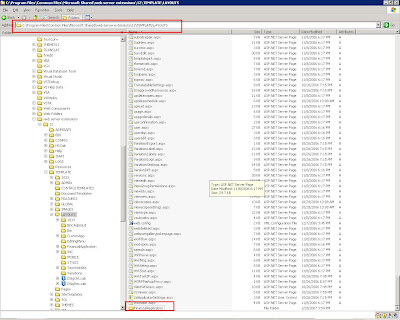


Now we can access the same application under context of SharePoint portal, use the following URL

http://localhost/_layouts/financialapplication/default.aspx and we get the following page:
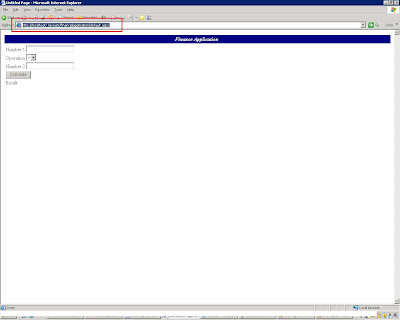


As we achieved one step of getting our application to the SharePoint context, our next step is to achieve SharePoint UI:


Step 2: Setting application UI to that of SharePoint


As mentioned above we can achieve the SharePoint UI by simply inheriting the master page of our portal. In order to achieve this lets open your “default.aspx” of “Financial Application “in Visual Studio 2005/Notepad.


In the page directive of “default.aspx “page add attribute:

MasterPageFile="~/_layouts/application.master" and add following directives:

  • <@ Assembly Name="Microsoft.SharePoint.ApplicationPages, Version=12.0.0.0, Culture=neutral, PublicKeyToken=71e9bce111e9429c"%>;

  • <@ Register Tagprefix="SharePoint" Namespace="Microsoft.SharePoint.WebControls" Assembly="Microsoft.SharePoint, Version=12.0.0.0, Culture=neutral, PublicKeyToken=71e9bce111e9429c" >;

  • <@ Register Tagprefix="Utilities" Namespace="Microsoft.SharePoint.Utilities" Assembly="Microsoft.SharePoint, Version=12.0.0.0, Culture=neutral, PublicKeyToken=71e9bce111e9429c" >;

The page would be like this:
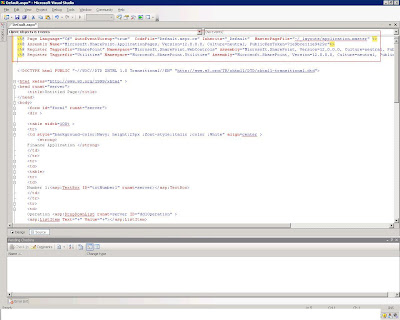


Once we are done with the master page reference we need to define the content of the page. As Master pages contains content placeholders we need to place complete “Form” section of our application to the appropriate content placeholder of the default.aspx. Lets define a content placeholder element in “default.aspx” page:


<asp:Content ID="Content1" ContentPlaceHolderId="PlaceHolderMain" runat="server">asp:Content>

Lets copy the complete form elements from our default.aspx and add it to the ContentPlaceholder named “PlaceHolderMain”. Copy all elements of <form> tag as shown below:
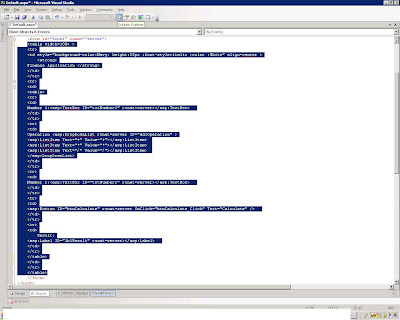


And paste it inside the content placeholder.”Default.aspx” now looks like:
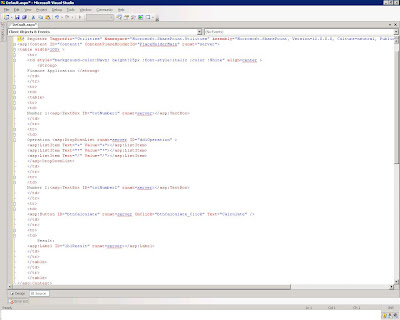


Let’s define the Title too using the ContentPlaceHolder “PlaceHolderPageTitleInTitleArea”


Add the following in “default.aspx” for defining title:

<asp:Content ID="Content2" ContentPlaceHolderId="PlaceHolderPageTitleInTitleArea" runat="server">Financial Application<asp:Content>

It seems we are done. Now when we try the same url http://localhost/_layouts/financialapplication/default.aspx

We get the page with SharePoint UI as shown below:


That’s it, 30 min of effort and your application seems to be a SharePoint application and now you can go forward and use the SharePoint context to achieve any tweaking with the SharePoint portal . You can get the code for Changed "Financial Application" from

http://www.box.net/index.php?rm=box_v2_download_shared_file&file_id=f_40004506

Saturday, January 27, 2007

Customizing Asp.Net 2.0 application to look like a SharePoint 2007 Portal: Approach 1

In any organization you can find plethora of application implemented, which are dependent /independent of each other. When such organization decided to move the portal way then the “AIM “ is to provide one “Window” for information for complete organization .This can be achieved by integrating the existing application with the portal application .In such case one important rule while implementing portal is to maintain “Consistent UI” across organization portal . The “consistent UI “site receives better acceptability by the end user. I got this requirement and wanted to share the simplicity of achieving this in SharePoint 2007 portal.

For showcasing this I have taken a web application which is a virtual “Financial application” for an organization .We will go forward and give this application “MASK OF SHAREPOINT”, doing that we achieve the important principal of portal acceptability “CONSISTENT UI”. There are number of approach which can be implemented to achieve. We will see both the case.

Let’s see how our application looks before we start our makeover:


As we see our application is a plain app which does basic computation.


First Approach:


In case we have independent application and just need a share point MASK in such case we can use “Page Viewer web part” .In Order to implement this , create a new SharePoint page in your SharePoint site .Site Actions->Create Page.


Name : Finance Application


URL : financeapplication
Page Layout: Blank Web Part Page


Press “Create”, you will get the page as shown below:


Click on “Add New Web Part” and select “Page Viewer Web Part” from the list.


Click “open the tool pane” in the web part to specify the finance application URL, and click apply.


You will get the “Finance Application“ page inside the “Page Viewer web part”, you might get the frame as the “Page Viewer Web part “ width and height is by default set to fit the web part zone .Feel free to modify the dimension of page viewer web part . Result page looks like:


This approach can be used in following situations:


  • When the application is completely independent and don’t need any information from the portal site i.e. it’s not required to run the Asp.Net application in context of the portal application

Second Approach:


This approach is advantageous when the application needs to “Run in the same context of SharePoint portal “


e.g.

  • Developing SharePoint administration custom page


We will see this approach in the next blog ;-). BREAK

Saturday, January 20, 2007

Hiding SharePoint 2007 List Context Menu Items


Am sure lot's of people would be wondering how to hide menu items of a list eg document libraries "Send to " menu item .


In olden days of SharePoint 2003 this used to be achieved using playing around with the OWS.jss file ,though the customization is same in SharePoint 2007 too but the file has been changed . Now the modifications needs to be done in CORE.JS file located at "C:\Program Files\Common Files\Microsoft Shared\web server extensions\12\TEMPLATE\LAYOUTS\1033\CORE.JS"


Let's change the file and see the difference , In order to hide menu item e.g "Send to " search for function named "AddSendSubMenu()" in CORE.JS and comment the function call . as shown in figure below:


That's it check the menu in doc lib now , does it looks like mine:-)


NOTE: Make sure you take back up of Core.js file before making any change in order to prevent any server functionality malfunction.

Thursday, January 18, 2007

Error Loading workflow Visual Studio 2005


Have you ever faced this issue and wondering what's wrong with the editor.Well in my case the sharepoint references were missing .

Monday, January 15, 2007

Automate back Up Process MOSS 2007

I hope it's a pain for all the SharePoint geeks to get the back up of there site manually either using Sharepoint administration/Sharepoint designer/stsadm.exe tool .

I was thiking about it and wanted to make my life simpler so thought of writing a tool to automate the process and here it is .

This tool is very basic and only limited to complete backup . Granular level backup is not supported .I haven't taken care of all the cases so tool might fail in certain condition.So there is possibility that the back up might fail and you might get "Success" message . well sounds scary :) .Just make sure you check the back up atleast first time .

I have included a word file with configuration info .Also included the complete 15 liner class file in case you want to make it more stable.

This is a normal command tool and needs to be run with windows scheduler.

Tool is available at :
Download

Saturday, January 06, 2007

Registering Event Handler for list events

To register event handler for list events , create folder in the \template\features folder named "EventFeature" which contain a feature.xml file that specifies the scope and ID of the "feature" and element .xml file that the former file references.The feature file might look like the following :


< Feature>
< Scope="Web"
Title="Event handler"
Id="Create a GUID"
xmlns="http://schemas.microsoft.com/sharepoint/" >
< ElementManifests >
< ElementManifest location="element.xml" >
< /ElementManifests>
< /Feature>

The element.xml file registers the event handler assembly and associates it with a list type, for announcement list type is 104 as shown below:


< Elements >
< Receivers
< ListTemplateOwners="name of site definition using which this site is created and this list belongs to "
ListTemplateId="104" >
< Receiver >
< Name >EventHandler< /Name >
< Type >2< /Type >
< SequenceNumber >10000< /SequenceNumber >
< Assembly > "NameSpace name of assembly"
,version=1.0.0.0,Culture=neutral,PublicKeyToken="public key token of assembly"
< /Assembly >
< /Class >"ClassNameOfAssembly"< /Class >
< Data >< /Data >
< Filter >< /Filter >
< /Receiver >
< /Receivers >
< /Elements >

Once we are done with feature creation ,register feature using stsadm.exe tool present in "C:\Program Files\Common Files\Microsoft Shared\web server extensions\12\BIN"

Run the following command to install feature :
stsadm -o installfeature -filename EventFeature\feature.xml

Run the follwing command to activate the feature:
stsadm -o activatefeature -filename EventFeature\feature.xml -url "url of the site"

That's it you are done with features ...just go forward and try adding ,deleting,editing in list and check weather it performs as per your expectations .

ENJOY!!! LIFE IS MUCH SIMPLER NOW :-)

Thursday, January 04, 2007

List Events in Windows SharePoint Services 3.0

Ever had these questions while working with lists/document library:
  • Is it possible to restrict users from entering invalid data?
  • Is it possible to have counters for files created ,deleted?
  • Is it possible to display users with "Custom Error" in case they try entering invalid data?
All these questions were kind of un-answered during days of SharePoint 2003 ,fortunately days have changed and Microsoft has solutions for it .Its the MOSS 2007/WSS 3.0 Events.

In WSS 3.0 events that are triggered by list allow you to hook up with code when the list itsms are added,changed or removed.
Events are divided in 2 category :
  • Events that fire before an action occurs :This allow you to perform custom validation or processing of data that is about to be added to the list,modified or deleted.
  • Events that fire after a certain action occurs
In WSS 3.0 it is possible to communicate responses back to the user interface.

You can create an event handler assembly using Visual Studio .NET by creating a class inhering from SPItemEventReceiver base class present in Microsoft.SharePoint.dll assembly.

using System;
using Microsoft.SharePoint;

namespace WSS.FirstTest
{
public class MyFirstEventhandler:SPItemEventHandler
{
}
}


This class will be instantiated by the WSS 3.0 when action occurs within the list. In order to define custom behaviour of these events we need to override the methods in SPItemEventReceiver class. Following method can be overriden:
  • ItemAdding
  • ItemAdded
  • ItemUpdating
  • ItemUpdated
  • ItemDeleting
  • ItemDeleted
  • ItemCheckingIn
  • ItemCheckedIn
  • ItemCheckingOut
  • ItemCheckedOut
  • ItemUncheckingOut
  • ItemUncheckedOut
  • ItemFileRenaming
  • ItemFileRenamed
  • ItemAttachmentAdding
  • ItemAttachmentAdded
  • ItemAttachmentDeleting
  • ItemAttachmentDeleted
We will override method ItemDeleting as sample.

public override void ItemDeleting(SPItemEventProperties property)
{
if(property.BeforeProperties["Amount"].ToString() >"500")
{
property.Cancel=true;
property.ErrorMessage ="Any amout greater than 500 cannot be deleted" ;
}
}

In this case when user tries to delete any item whose Amount is greater than 500 gets an error message .

Now as we have done with the Event assembly the next task is to register the assembly.In my next Blog we can check out the registering of events to a list.

Wednesday, December 20, 2006

Adding additional Web Part Zone in SharePoint 2007 Page

Simple Steps:

  • Open SharePoint website using SharePoint Designer 2007
  • Open the desired page where you need additional “WebPart Zones”
  • Web parts zones needs to be defined in Content Placeholders .Make sure you have corresponding placeholders in Master page .
  • Add the following line at desired content placeholder of your page :

    < runat="server" frametype="TitleBarOnly" id="Left" title="loc:Left">
    <>
    < /ZoneTemplate>
    < /WebPartPages:WebPartZone >

    If you need more Web Part Zones Replicate the above code and change the "Title" and "ID" attribute.


  • WSS 3.0 vs MOSS 2007

    Generic Questions and here is the answer:

    http://office.microsoft.com/en-us/sharepointtechnology/FX101758691033.aspx

    Saturday, December 16, 2006

    Custom Workflow using SharePoint Designer 2007

    I could not find a simple descriptive article on creating workflow using sharepoint designer so here it goes if you are looking out for one . The custom workflow is one level but using designer life is so simple that adding multiple level is matter of "kind of duplicating" the steps .You can also view the same document at url http://docs.google.com/View?docid=dgqwf6bx_20c5ghkm and save as .mht for offline reading.

    Scenario

    • Author creates document and submits the approval request to the

    • Reviewer approves/rejects the document.

      • In case of approval email is sent to author notifying approval

      • In case of rejection email is sent to author notifying rejection

    Implementation :


    • Create an sharepoint list with approval enabled

    • Open sharepoint designer 2007

    • Open the desired site for workflow as shown below :

      • Click File ->Open Site

      • Enter the url of the desired site in site name section and press “Open”


      • This will open the site

    • Creating new workflow

      • Click File -> New

      • The “New “ Dialog box will pop up

      • Select “SharePoint Content” tab

      • Select workflow from the list box “Blank workflow”


      • Assign appropriate name to workflow in my case its “Approval workflow”

      • Select the list in sharepoint list to which this workflow should be associated

      • Select the start condition of the workflow

        • Start when item is created

        • Start when iten is changed

        • Manual workflow start up


      • Before we start we will go forward and define some initiation workflow variables .

      • Click on the initiation button

        • Define a variable named “workflowstatus” and set the default value as “notstarted”


    1 STEP 1


    • Lets start defining the workflow

      • First define a step name “To Approver”

      • Click conditions button and you will get an drop down


      • Select “Compare any data source” you will get option as shown in figure

      • click on the “value” you will get an input box with an eclipse button like this


      • Click on that “fx” eclipse button

      • You will get dialog box like this with “current item” as default selection

      • change the selection to”Source: workflow data” and in the field section select :Initiation :workflowstatus”


      • Click Ok

      • Now select the “value” field after “equal “ and in the input box fill “notstarted”

      • No we are ready with our condition with says “ If “workflowstatus” variable is equal to “notstarted” then execute the defined action

      • Lets Go forward and put process in our action section

      • select “Set workflow variable”

      • Set the values as shown in fig below

      • Now we have set the workflow variable” workflowstatus”to started

      • Lets send E-Mail to the Reviewer for approval request

      • From the actions Menu select send an EMAIL

        • click on “this message” which will eventually pop up a self descriptive dialog box

        • Fill all the appropriate fields for EMAIL and Email is set

          • To : “Reviewer Email ID”

          • Subject

          • Body

      • After email to reviewer we have to make sure that our workflow waits for “Approval/Rejection ” from the Reviewer

      • In order to achieve a “WAIT” we have to add one more action

        • So click on the actions and select “Wait for field change in current item”

        • Assign values and make condition as shown below

    Ie Wait till the “Approval status “ is not either “Approved/Rejected”

    • We are done with our first step where the author has requested an approval and reviewer has received mail of approval request


    2 STEP 2


      • In this step we have to take care of 2 conditions “Approved /Rejected “

      • To define seconf step click “Add workflow step “on eight pane of workflow designer

      • The Second step would look like this

      • So define 2 conditions “If approved “ and If Reject “

      • The branching of condition can be achieved using the drop down of activity

      • This will take care of the second step

      • Once the email is send stop the workflow by selecting “stop workflow” from the Action menu , this make stop the workflow and make the workflow status to complete


    NOTE: Always make sure to stop workflow in all the implementation, in case its missed the workflow will still be alive in the system and that might lead to server performance degradation


    Thursday, December 14, 2006

    MOSS 2007 Site Object Model in NUTSHELL


    People search not working in MOSS 2007 Server

    Scenario :

    Setting up Search functionality in Sharepoint server site, which needs configuration of Shared Services Provider (SSP) :• Setting up user Profiles• Setting up address to be crawled• Set up of Scope …
    After the complete configuration on testing, you might come across situation where search in site data works but people search doesn’t seem to work .This can really be nerve clinching …well though it seem like a big issue with installation and stuff but it’s a “miss” in configuration setting.
    The addition of url “sps3://sitename “works wonders…..well am sure this is surely going to make my Christmas celebration much better …

    Wednesday, December 13, 2006

    Implementing Multiple Authentication for MOSS 2007 Portal Site( EXTRANET )


    The above depicted scenario is as follows:
    • The internal user information are stored in Active Directory
    • External user information is stored in SQL database.

    In such case of multiple authentication source requirements, we need to configure the site in different zone. The authentication can be defined with respect to these defined zones.
    Zone represents different logical path for gaining access to same physical application. To create a new zone, extend the Web application. In the Load Balanced URL section, specify the URL and zone type.


    <---- The Zone URL can accessed as shown
    <--- Set the Zone URL After extending an application we can set the authentication of the application to each zone for e.g. as shown below the web application is set to default zone set to "windows auth " and internet zone set to SQl authentication .

    <-- Figure show same web application with different Zone and authentication


    Other good articles :
    http://blogs.msdn.com/sharepoint/archive/2006/08/16/702010.aspx

    http://www.sharepointblogs.com/andynoon/archive/2007/07/04/defining-multiple-authentication-providers-to-a-single-moss-2007-web-application.aspx

    Tuesday, December 12, 2006

    Integrating Outlook Client Calendar with MOSS 2007 Calendar


    All the users from outlook world am sure would love the calendar functionality provided by Outlook client , but when you try to show then the SharePoint calendar , they come with same old question “Can i sync my SharePoint Calendar with Outlook Calendar “ .The answer would be yes and no .

    It is possible to have the SharePoint calendar within your outlook client, sounds interesting J
    Well let’s go forward and open the SharePoint calendar.Click on the “Actions” menu as shown below and click on the “Connect to Client” menu item .As shown above.

    This will open Outlook client with calendar as shown and market in below figure...


    This way the SharePoint can be kept in sync with the outlook client .Advantage of this approach is that in case the SharePoint portal server is not available the data can be accessed via client as its stores a copy of the calendar. This improves the offline capability of SharePoint.

    Friday, December 08, 2006

    Unable to open infopath form in browser , Session Cookie disabled Error MOSS 2007


    I  am not  sure till now the reason for this error , i tried all the  solution even allowing all the cookies settings in browser but negative result .
    The amazing thing  during this process whcih came into my notice is that , when i try to open the form in Firefox it works fine . But that's not the solution as the users in my current implementation were using IE 6.0+ .

    Though i could not figure out reason for that but fortunately it worked in the newly installed server with release version of MOSS 2007 .
     
    So conclusion from my end is that if by any chance u bump into this problem , it may be due to soem installation error in server and that too if you are running with Beta 2/TR .In such case install the Evaluation version of MOSS 2007 in clean server and life would become much better . In case you are aware of any workaround or solution make a note here .

    Rags

    "My Site :Page not found" MOSS 2007

    This might arise if the current database containing the SSP data has been deleted accidently

    .

    Solution :

    1) In Such case try to restore the SSP site from site backup if you have taken one

    2) Recreate Shared Service Provider for the web application. There will be data loss by this approach

    ·        The complete MySite information of all the users will be lost and they have to fill the details once more

    ·        Search and profile data needs to be repopulated using the SSP administration

    Tuesday, December 05, 2006

    "Search service is offline "


     This error turns up when the Index server is not defined in the SSP(Shared Service Provider).Edit the SSP and assign an index server .


    Rags

    Tuesday, November 28, 2006

    "Error Loading Workflow" Visual Studio .NEt 2005

    Its great day  and i have decided to create an "Custom workflow" got one sample from internet and life seems to be soo easy/But the truth is not that easy ...
    As soon as i started to create a Workflow project using sharepoint workflow template which u can get by downloading the ECM Starter kit "http://www.microsoft.com/downloads/details.aspx?FamilyID=38CA6B32-44BE-4489-8526-F09C57CD13A5&displaylang=en "
     
    Well started the project and selected sequential work flow and was shocked to get the error message :
     

    Error Loading Workflow


    An error occurred while loading the workflow. Please correct the following error and try reloading the document to view the workflow. :(


    Thought of doing soem research but no luck initially  .Took a tea break and then started with a revitalized mind. It came to my notice that i am missing three components from the project reference

    • Microsoft.sharepoint.workflowactions.dll
    • Microsoft.office.workflow.tasks.dll
    • Microsoft.sharepoint.dll
     
    Added these references and wolaah ...Things started working ...
     
    Life is real good ....
     
     
    Rags


    Monday, November 27, 2006

    "Unknown Error" in BETA 2 TR during "Alert Me" registration

    Just Run this :
     
    stsadm -o updatealerttemplates -url http://server -filename "C:\Program files\common files\Microsoft shared\web server extensions\12\template\XML\alerttemplates.xml" 
     
     
    and u will be done .
     
    Rags
     

    Tuesday, October 31, 2006

    MOSS 2007 Beta 2 TR Installation

    Link for Beta 2 TR installation
     
    Note  : You need to have MOSS Beta 2 installaed in your machine before upgrading with MOSS 2007 Beta 2 TR version .

    Friday, October 13, 2006

    Lotus Notes - MOSS 2007 :Feature Mapping

    In my last article was on migration approach from Lotus Notes to MOSS 2007 , well that itself was a daunting task .You get that part
    "RIGHT" and life is heaven .
    One fine Weekend  morning i decided to have a look to one of the Lotus application to be migrated to MOSS 2007, i preffered to sit with my Lotus Notes expert in order to explore the "Maze " of Lotus platform , didnt wanted to get lost :-)

    Well the application to be dissected was a kind of manual application  which stores the information about organization in hierarchical format.
    Lotus notes expert were on it and during dissection it came to my notice that there are multiple forms in one application ,each form with different fields.

    As per my understanding of the not so old days of SPS 2003, its only possible to have   list with multiple fields(ie in lotus notes term one form with multiple field) .

    Then came the question of life "How am i gonna migrated this multiple form thingy to my MOSS 2007" .My instant reaction GOD "SOS"

    Well i feel god heard :) and "Wollah" there is  a new feature in MOSS 2007 named "CONTENT TYPES" . I have started loving this product now .

    In simple terms "Content Types" are entities which to stores multiple content in same object(every content type can have different fields)

    So in simple terms

    LOTUS NOTES                             MOSS2007

    Notes Form <---------------------------> Content Type
    Fields   <---------------------------------->  Fields


    Tuesday, October 10, 2006

    Tool for Lotus Notes Application Migration

    During my current Lotus to SharePoint migration the mail concern was the migration approach and cost associated with it . There were 2 options :
    1)Either create a migration tool as per requirement which means a good number of  Person Hours
    2)Second approach is to buy a third party tool ,but in this case as there arevery few lotus application to be migrated and that too they were simple ones so buying a tool was not a right decision and was not even good fit for  budgetting of the project .

    After lots of research i got the "Microsoft Application Transporter 2006 for Lotus Domino" from Microsoft .Download from " http://www.microsoft.com/downloads/details.aspx?FamilyID=c6066e89-7690-44a4-86d6-ab1d60808022&DisplayLang=en"
     
    Now this fits to our requirment and i must say that tool is good enough for simple and average complexity  Lotus notes application migration


    Reference Architecture: Building a Cost Optimized, High-Throughput HL7, EDI, and FHIR Processing Pipeline on OCI ( Published in Oracle Blog)

     OCI (Oracle Cloud Infrastructure) provides more than 200 services to build your next enterprise application. Explore the blog to learn how ...